/quickprint · Manual
MhQuickPrint · Integration Manual
This manual is for developers integrating MhQuickPrint into a business system: how to connect, what to send, how to render pages, and how to handle jobs and errors — all in one document. End users only need section 1.
01Quickstart (end users)
- 01
Download & run
Get the single exe (~1.3 MB) from the download page, drop it in a fixed folder and double-click; the tray icon means the service is ready. There is no main window — left-click the tray for status, right-click for the full menu.
- 02
Preview & print
When your system triggers a print, the native preview opens: page, zoom, switch printers, pick paper, set copies and margins; hit Print and paper comes out.
- 03
Quit
Right-click the tray icon → "Stop service and exit" (with confirmation). One instance at a time.
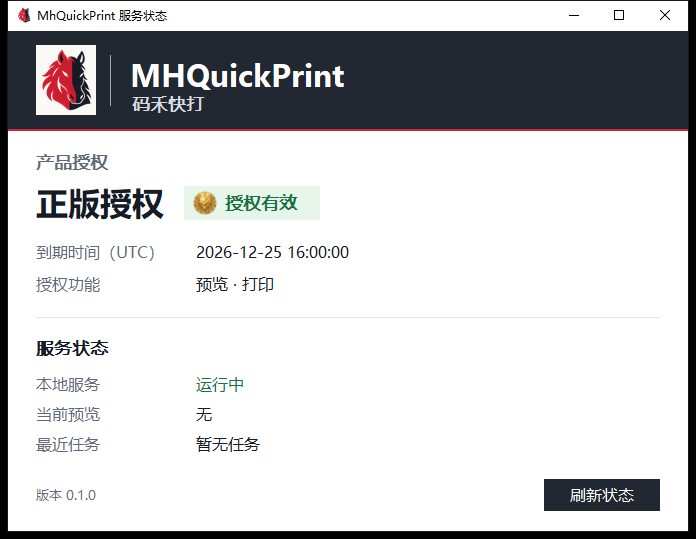
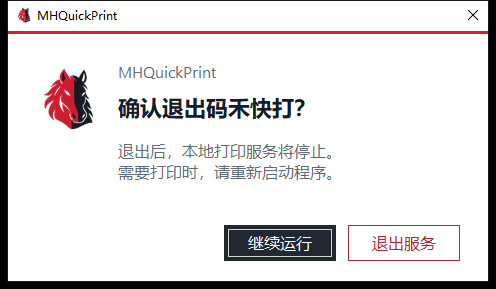
02Architecture
Your host program decides what to print: it lays out the document, label or receipt as a full-page bitmap (PNG), sized to the target printer's DPI.
MhQuickPrint delivers it precisely: the same bitmap feeds the preview window and the printer — 1:1 device-dot output, no rescaling in between — so the preview is the print.
The two sides talk over a Windows named pipe — an in-machine channel with no network and no open ports; only the current user's programs can connect. Browser pages cannot and need not connect directly — in a web system, the backend or a local client (e.g. an Electron main process) acts as the pipe client.
03Integration at a glance: five steps
- 01
Check the service
Connect to the named pipe and send system.hello; a serverVersion in the reply means the service is alive.
- 02
List printers
printers.list returns printers and queue status; pick your target printerId.
- 03
Query capabilities
printers.capabilities returns dpiX / dpiY, paper sizes (micrometers), printable area, and the capabilityHash.
- 04
Render the page
Render the page as one full-page PNG at the target DPI: dots = mm × DPI ÷ 25.4 (rounded).
- 05
Preview or print
jobs.preview opens the native preview; jobs.print prints silently; track with jobs.status and cancel with jobs.cancel.
04Transport & limits
The pipe name is fixed: \\.\pipe\LOCAL\MhQuickPrint.v1. Integers are unsigned little-endian; text is UTF-8 JSON. The pipe DACL admits only the current interactive user, Administrators, and SYSTEM — network logons are denied. Every request also carries a callerId and a timestamp.
05Frame format
Each request and response is one frame: the JSON control document first, then page binaries (PNG) as blobs, all lengths declared in the frame header — no Base64.
uint32  jsonLength        // 控制文档长度
byte[]  json              // UTF-8 JSON
uint32  blobCount         // 附带二进制页数量
repeat blobCount 次:
  uint64  blobLength      // 该页 PNG 字节数
byte[] blob // 整页 PNG 点阵{
"protocol": 1,
"requestId": "123e4567-e89b-12d3-a456-426614174000",
"callerId": "LabelTrunk",
"timestampUtcMs": 1700000000000,
"command": "system.health"
}protocolintProtocol version, currently 1requestIduuidCorrelates one call; echoed in the responsecallerIdstringCaller identity (your system name)timestampUtcMslongLocal UTC epoch ms (±5 min)commandstringCommand name, see next section06Command reference
Command overview (blobs carried and purpose):
{
  "protocol": 1,
  "requestId": "123e4567-e89b-12d3-a456-426614174000",
  "callerId": "LabelTrunk",
  "timestampUtcMs": 1700000000000,
  "command": "jobs.print",
  "job": {
    "clientJobId": "123e4567-e89b-12d3-a456-426614174001",
    "name": "ENTRY-TEMPLATE",
    "printerId": "stable-printer-id",
    "copies": 1,
    "paper": { "widthMm": 100.0, "heightMm": 60.0 },
    "device": { "dpiX": 203, "dpiY": 203, "capabilityHash": "sha256" },
    "pages": [
      { "widthDots": 799, "heightDots": 480, "format": "png", "blobIndex": 0 }
    ]
  }
}{
"protocol": 1,
"requestId": "123e4567-e89b-12d3-a456-426614174000",
"ok": false,
"error": {
"code": "MQP-3002",
"message": "页面与二进制数据不匹配"
}
}system.hello0Handshake: negotiate protocol and versionssystem.health0Runtime, license and update healthprinters.list0Printers and brief queue statusprinters.capabilities0DPI, papers, printable area, capability hashjobs.previewone per pageOpen the native preview with page bytesjobs.printone per pageValidate and submit a silent printjobs.status0Read current task statejobs.cancel0Request cancellation, return truthful statesettings.getCalibration0Read calibration (not yet open in 0.1.0, returns MQP-1005)settings.openCalibration0Open calibration UI (not yet open in 0.1.0)clientJobIdstringBusiness-unique job id: same id + same payload returns the original job; same id + different payload returns MQP-4002, never prints twicenamestringJob name for identificationprinterIdstringStable target printer id (from printers.list)copiesintCopies, 1–999paper.widthMm / heightMmnumberPaper width/height in mm (source of truth)device.dpiX / dpiYintDPI used for rendering; must match printer capabilitydevice.capabilityHashstringCapability hash (from printers.capabilities); a change rejects the job for re-renderpages[].widthDots / heightDotsintPage size in dots = mm × DPI ÷ 25.4, roundedpages[].formatstringPage format; only "png" is acceptedpages[].blobIndexintBlob index in the frame; must be unique and cover every blob exactly once07Page rendering rules
Layout belongs to the caller: barcodes, QR codes, tables and text are drawn into the full-page PNG by your engine. MhQuickPrint does exactly two things — preview display and 1:1 device-dot output, never rescaling.
Size formula (round to integer):
widthDots  = Math.round(widthMm  * dpiX / 25.4)
heightDots = Math.round(heightMm * dpiY / 25.4)

// 例:100 × 60 mm 热敏纸 @203 DPI
// widthDots  = Math.round(100 * 203 / 25.4) = 799
// heightDots = Math.round(60  * 203 / 25.4) = 480
Validation: page dot size must exactly match paper mm × DPI, or the job is rejected (misplaced prints are prevented); after switching to a printer with a different DPI, re-render at the new capability before submitting.
08Job states & idempotency
State machine: Created → Previewing / Validating → Spooling → Queued → Printing → Completed / Failed / Cancelled. Honest semantics: Queued means Windows accepted it; Completed means it left the spooler with no known error — it does not claim physical paper.
Idempotent dedup: submit with a business-unique clientJobId. Network retries and double-clicks all resolve to the same job; the same id with different content returns MQP-4002 instead of a second print.
09Error codes
Every error carries a stable MQP code and a readable message, grouped by family:
MQP-1xxxProtocol / IPC: broken frame, over limit, timestamp drift, unimplemented command (MQP-1005)MQP-2xxxPrinter / driver: missing printer, offline, capability hash changed (MQP-2007)MQP-3xxxPage / image: not PNG, size mismatch (MQP-3002)MQP-4xxxJob / queue: clientJobId conflict (MQP-4002), etc.MQP-5xxxLicensing: not licensed (MQP-5001)MQP-6xxxInstall / update10Node.js reference client
A runnable pipe client reference (same origin as the official debug tool) — drop it into an Electron main process or a local service:
import net from 'node:net';
import { randomUUID } from 'node:crypto';

const PIPE = '\\\\.\\pipe\\LOCAL\\MhQuickPrint.v1';

function frame(json, blobs = []) {
  const control = Buffer.from(JSON.stringify(json));
  const parts = [Buffer.alloc(4), control, Buffer.alloc(4)];
  parts[0].writeUInt32LE(control.length);
  parts[2].writeUInt32LE(blobs.length);
  for (const blob of blobs) {
    const len = Buffer.alloc(8);
    len.writeBigUInt64LE(BigInt(blob.length));
    parts.push(len, blob);
  }
  return Buffer.concat(parts);
}

export function send(command, fields = {}, blobs = []) {
  const request = {
    protocol: 1,
    requestId: randomUUID(),
    callerId: 'my-app',          // 你的系统标识
    timestampUtcMs: Date.now(),
    command,
    ...fields,
  };
  return new Promise((resolve, reject) => {
    const socket = net.createConnection(PIPE);
    const chunks = [];
    let expected = null;
    socket.setTimeout(10000, () => socket.destroy(new Error('响应超时')));
    socket.once('connect', () => socket.write(frame(request, blobs)));
    socket.on('data', chunk => {
      chunks.push(chunk);
      const data = Buffer.concat(chunks);
      if (expected === null && data.length >= 4) expected = data.readUInt32LE(0);
      if (expected !== null && data.length >= expected + 8) {
        socket.end();
        resolve(JSON.parse(data.subarray(4, 4 + expected).toString('utf8')));
      }
    });
    socket.once('error', reject);
  });
}import { send } from './qp-client.mjs';
// 1) 确认服务在线
await send('system.hello');
// 2) 选择打印机并读取能力(printerId 来自 printers.list)
const caps = await send('printers.capabilities', { printer: { printerId } });
const device = caps.result; // dpiX / dpiY / capabilityHash / papers[]
// 3) 按目标 DPI 渲染整页 PNG(100 × 60 mm 热敏纸)
const widthDots = Math.round(100 * device.dpiX / 25.4);
const heightDots = Math.round(60 * device.dpiY / 25.4);
const png = await renderLabelPng(widthDots, heightDots); // 你的排版引擎
// 4) 静默打印(blobIndex 对应 blobs 数组下标)
const result = await send('jobs.print', {
job: {
clientJobId: orderNo, // 业务唯一号:防重复打印
name: 'ENTRY-TEMPLATE',
printerId,
copies: 1,
paper: { widthMm: 100, heightMm: 60 },
device: { dpiX: device.dpiX, dpiY: device.dpiY,
capabilityHash: device.capabilityHash },
pages: [{ widthDots, heightDots, format: 'png', blobIndex: 0 }],
},
}, [png]);
if (!result.ok) throw new Error(result.error.code + ' ' + result.error.message);